← Back to projects

Case study · Klaviyo

Subject Line Assist

Klaviyo's AI could write brand-aligned subject lines automatically. Only 1.74% of users were using it. I redesigned the interaction model from scratch and drove an 8× increase in adoption.
Subject Line Assist
Company
Klaviyo
Focus
Interaction Design · AI UX · Experimentation
Impact
1.5% → 24% account-level adoption

Background

Great AI. Nobody using it.

Klaviyo's Subject Line Assistant used your brand's historical emails, tone, and segment data to generate personalized subject lines automatically. The AI was good. But across every customer tier — from scrappy startups to enterprise accounts — barely anyone was using it.

Average adoption: 1.74% of messages. Flat. Across all segments.

LENT
2.8%
Large enterprise
UENT
2.0%
Upper enterprise
LSMB
1.6%
Large SMB
USMB
1.3%
Upper SMB
MM
1.0%
Mid-market

User tickets told the same story. About 5 tickets and 10 chats every month — all saying the same things:

Too many clicks
The SLA required clicking an icon, filling in context fields, and clicking generate — multiple screen changes just to see a suggestion.
Disconnected from writing
Users had to leave the subject line field entirely to access the assistant, breaking their flow at the exact moment they needed help.
Suggestions felt generic
Output didn't reflect brand voice or campaign context. Users didn't trust it, so they didn't use it again.
Hard to learn
"Takes time to learn to generate subject lines that are brand relevant" — users gave up before they ever got good results.

Design thinking

The interaction model was the problem.

My goal: reduce clicks to 3 or fewer, integrate brand services, and get adoption to ~5% of messages. But before picking a direction, I explored three fundamentally different theories of how AI should enter the writing experience.
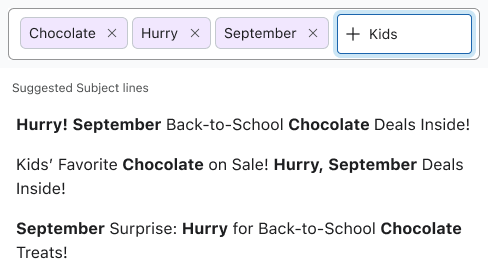
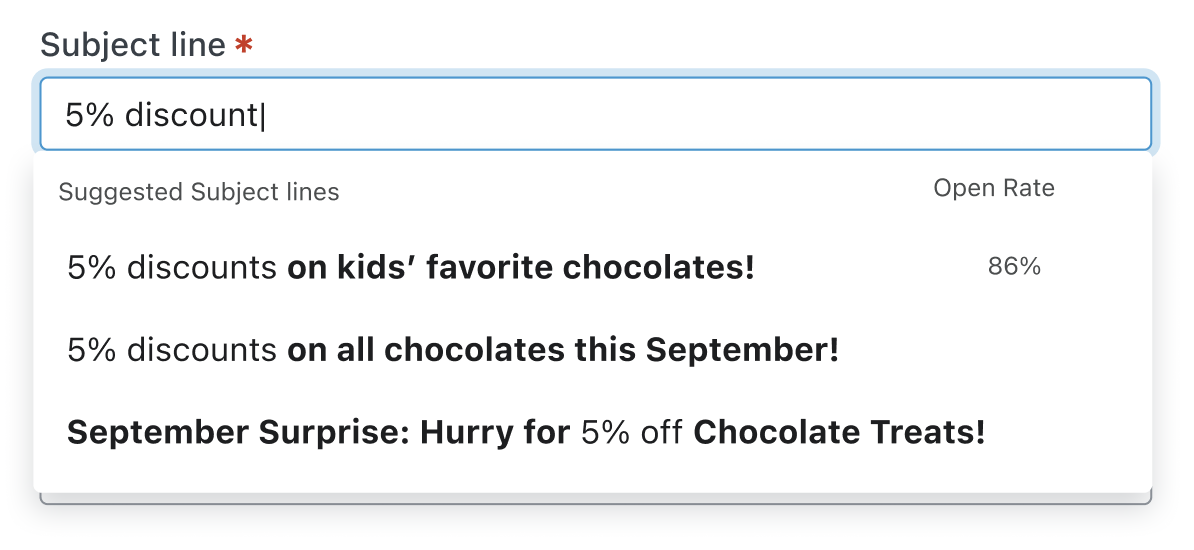
Keyword-Based Prompting
Keyword-based prompting
Users guide AI with keywords — adds intent, but still an extra step. Creates uncertainty around what the AI will do.
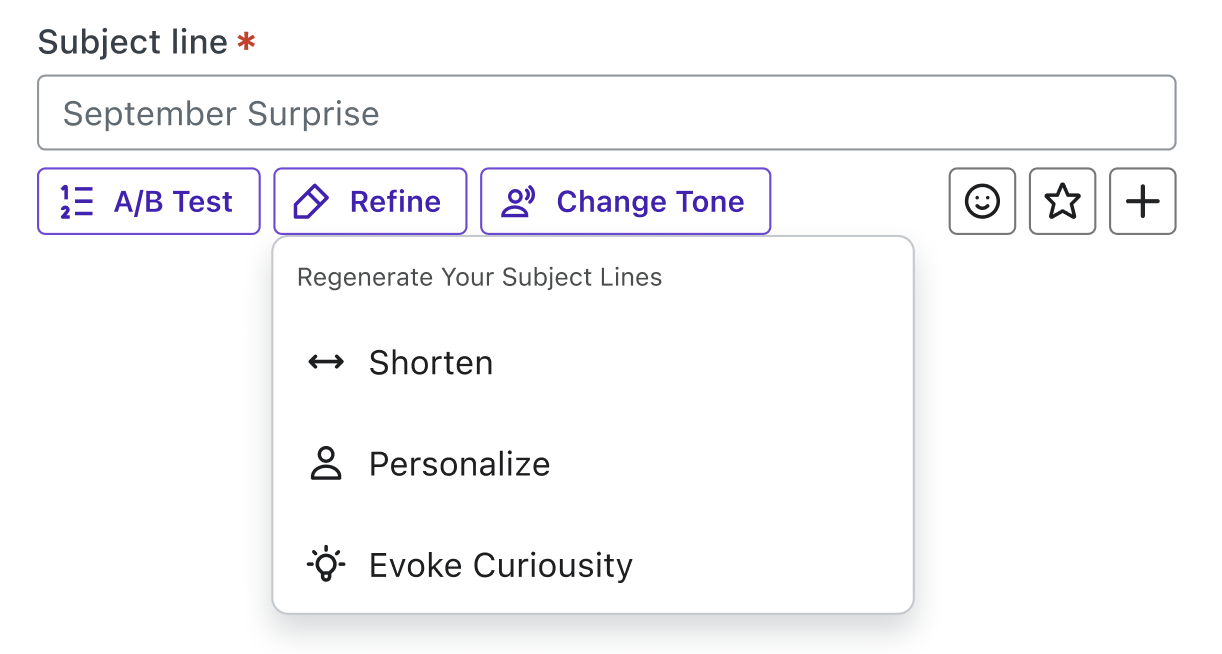
Toolbar-Based AI
Toolbar-based controls
AI triggered via a sparkle icon — more efficient, but still reactive. Users have to remember to activate it every time.
Performance-Informed
Performance-informed
Surfaces past subject lines with open rates — builds trust but raises data clarity concerns and echo-chamber risk.
Key insight
Every concept still required users to do something extra. The pattern became clear: any friction — a click, a modal, a context field — was enough to make users skip it. The guiding principle: guidance without friction.

Experimentation

Three experiments. One clear winner.

I designed and shipped an A/B/C experiment across ⅓ of all Klaviyo users — free and paid — to isolate the impact of proactive vs. reactive AI and inline vs. modal interactions. Each user account was assigned to one variation so experiences stayed consistent.

Control · A
Modal
Existing multi-step experience — click icon, fill context, click generate
Variant · B
Reactive
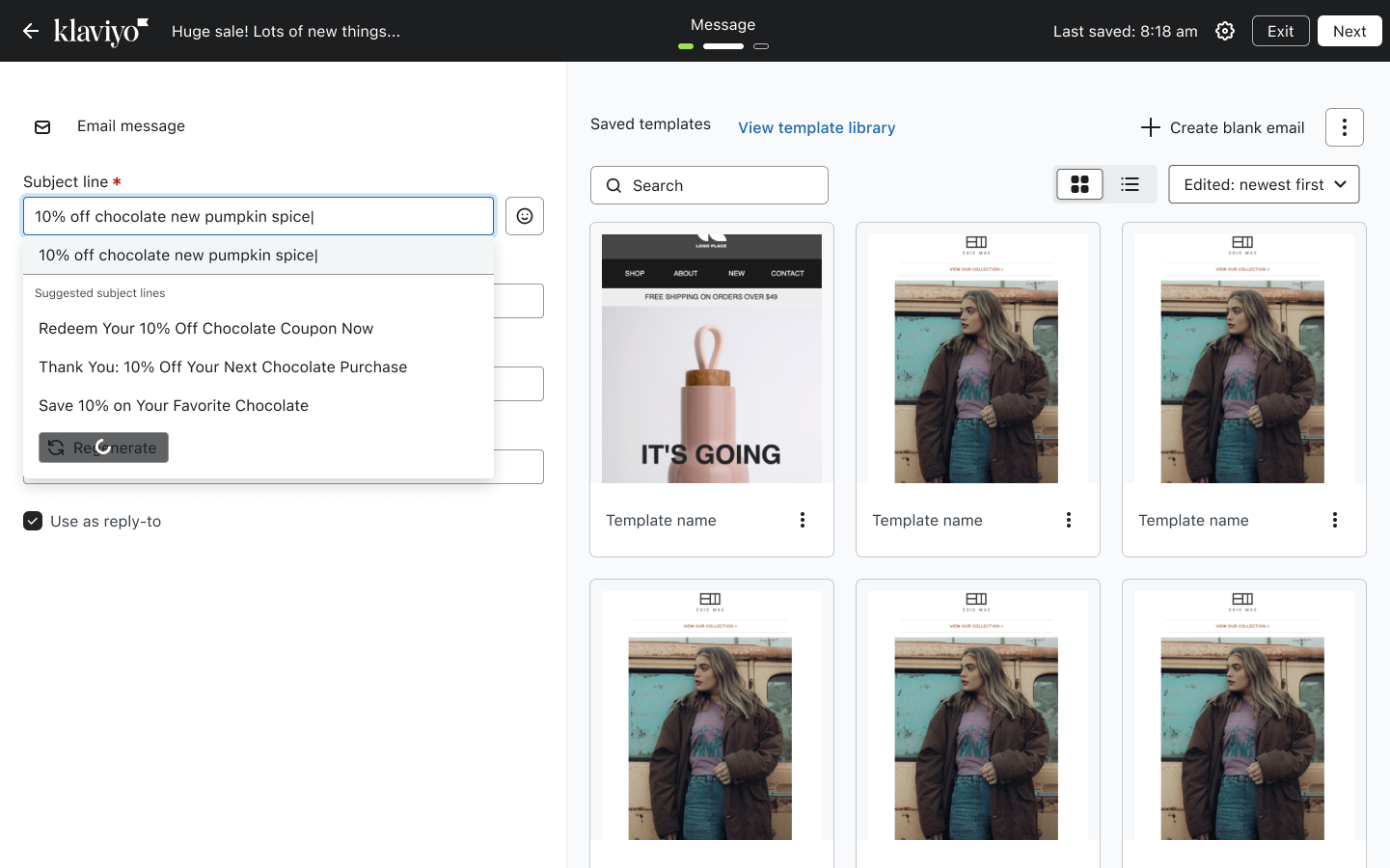
Sparkle icon triggers inline suggestions with a regenerate option
Variant · C · chosen
Proactive
Suggestions surface on focus, refresh every 3 words with a 2-second pause

Control — existing modal-based Subject Line Assistant
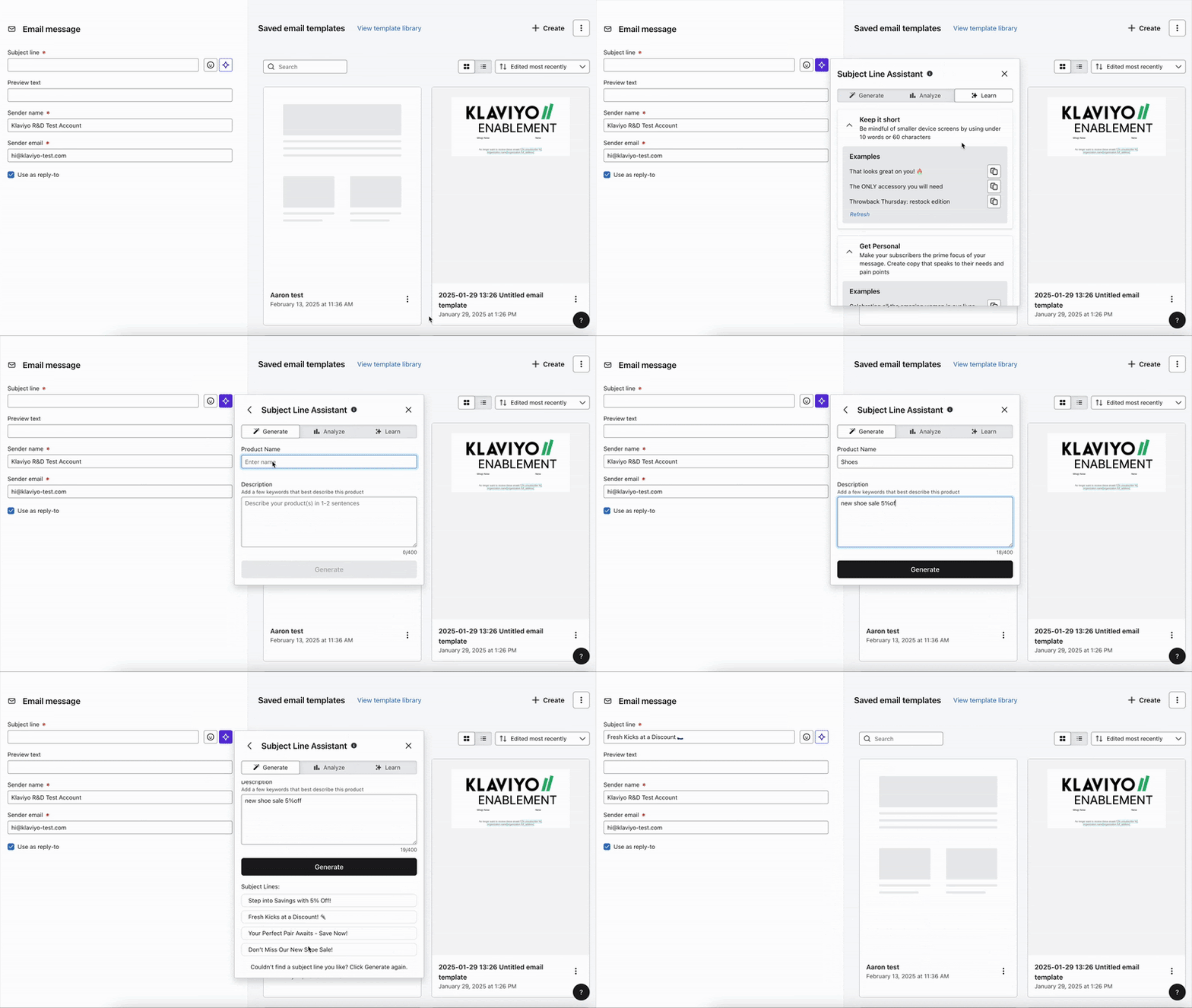
Control

Variant B — reactive AI via sparkle icon
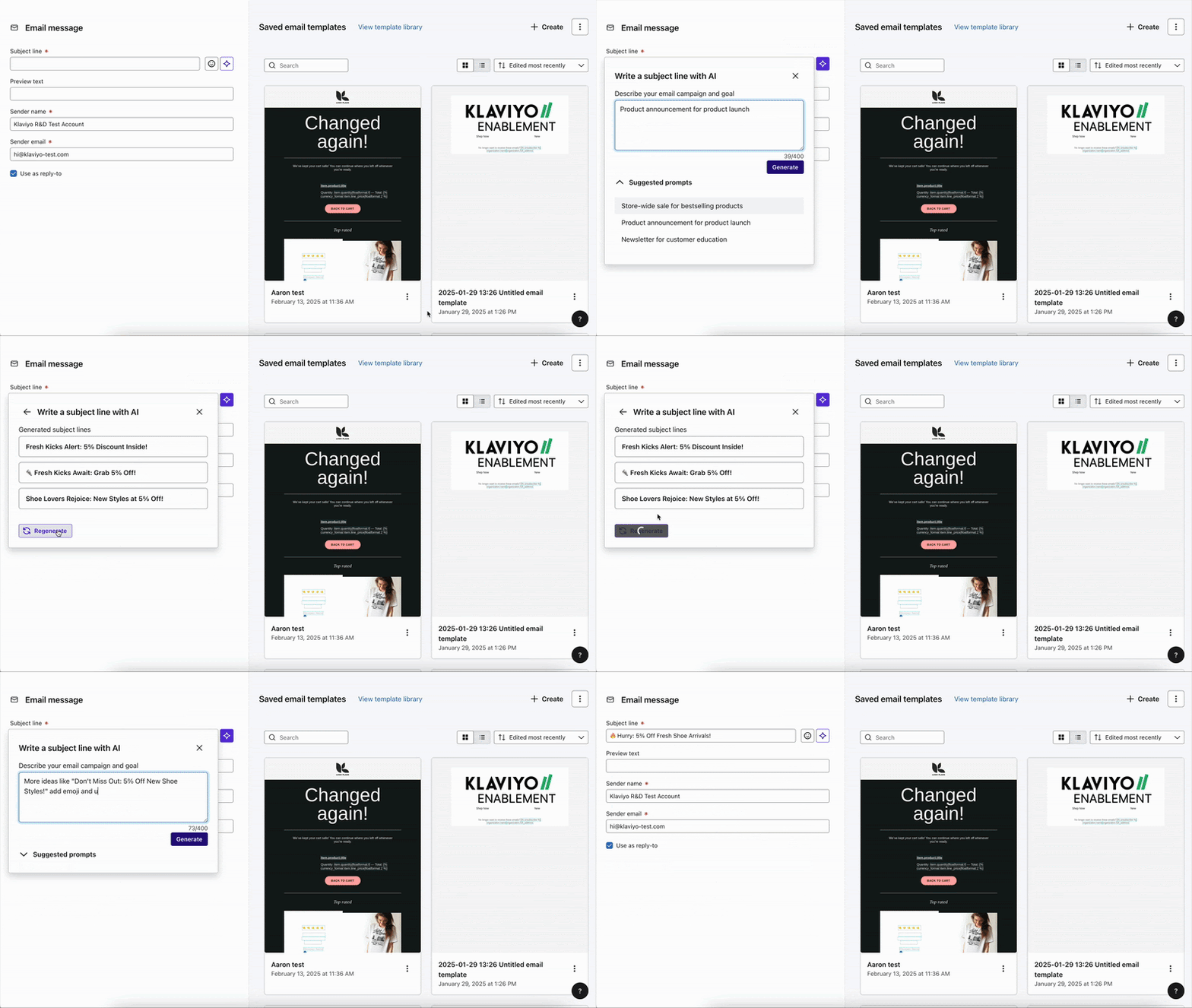
Reactive AI

Variant C — proactive inline AI surfacing suggestions as users type
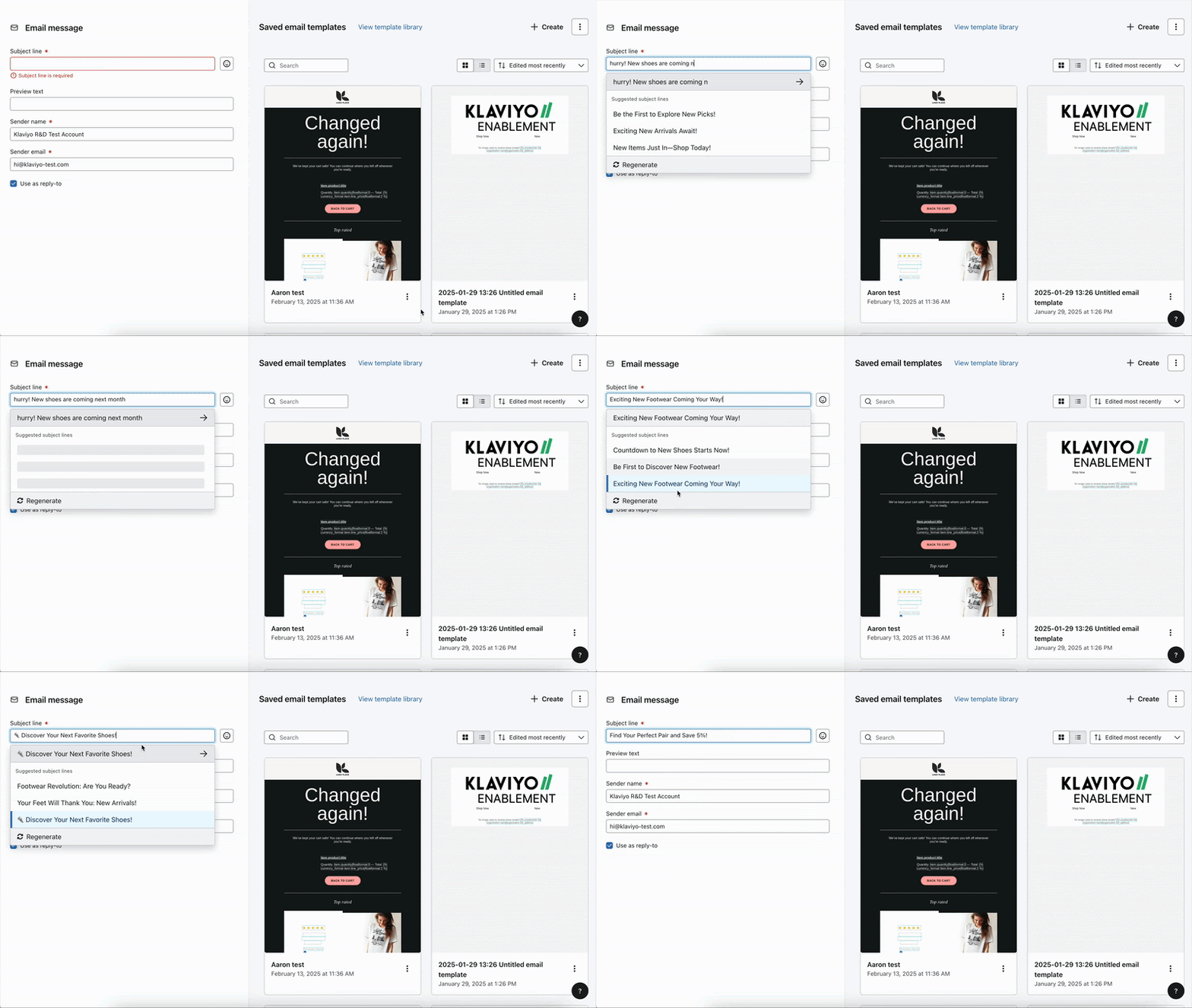
Proactive inline AI
Experiment takeaway
Proactive inline AI drove ~6× higher message-level adoption and ~8× higher account-level adoption vs. the modal baseline. Interaction design — not the AI model — was the constraint the whole time.

Final design

Type. See. Choose.

Variant C became the shipped experience. Proactive adaptive autocomplete — embedded directly in the subject line field, pulling from the user's last 5 emails, brand tone service, and segment attributes (lifecycle stage, product preferences). No modal. No extra clicks. The AI shows up where you already are.

Final Design

Key design decisions

Discoverability
Suggestions appear when the field is focused — no activation step, no icon to hunt for. Zero additional clicks to see the AI.
Timing
Suggestions refresh every 3 words with a 2-second pause — responsive to context without interrupting the writing rhythm.
Control
A visible loading state lets users cancel a refresh and keep the current suggestions. AI supports — never blocks.
Exploration
Regenerate gives users a new set of suggestions without losing their place — iteration without commitment.
Brand relevance
Suggestions pull from historical subject lines, the brand tone service, and segment attributes — so output feels like yours, not generic AI copy. When no historical data exists, the system falls back to segment context (e.g. "Holiday Specials for Our Loyal Shoppers!") rather than going generic.

Impact

Results

1.5% → 8–9%
Message-level adoption (~6× increase)
3% → 24%
Account-level adoption (~8× increase)
Reflection
The AI was already good enough. What changed was where and when it showed up. Moving from a modal users had to find — to suggestions that appeared in context, without a single extra click — was the entire unlock. The PRD originally targeted 3× adoption (~5%). We hit 8×. Sometimes the best design decision is removing the decision entirely.